Notes Linking
Versions and Enabling
Notes linking is enabled in 1.6.3 and 1.7. For older releases follow the instructions in HelpOnConfiguration for "url_schemas". Add the word "notes" in lowercase to the schemas.
Creating Notes Links
- In Notes, select the document and open document properties
On the tab: <+>, there is an identifier field
- Copy the contents of the identifier field to the clipboard.
- Paste the contents into the wikipage
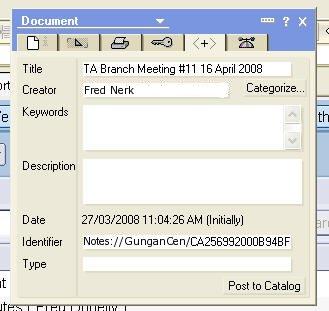
Notes://GunganCen/CA256992000B94BF/BC4B9A3C3F7C5458CA256A6C001A64F1/B0558F2B9DDB41C3CA25741900006827
- You can do the normal linking markup for example, add some square brackets and some override text:
[[Notes://GunganCen/CA256992000B94BF/BC4B9A3C3F7C5458CA256A6C001A64F1/B0558F2B9DDB41C3CA25741900006827 | TA Branch Meeting]]
- It is best practice to remove the server name. This means that if the server name changes, or the content moves to another server, the link should still work. When you remove the server name ensure that there are 3 forward-slashes between "Notes:" and the replica ID
[[Notes:///CA256992000B94BF/BC4B9A3C3F7C5458CA256A6C001A64F1/B0558F2B9DDB41C3CA25741900006827]]
Change "Notes:", at the beginning of the line to lowercase. MoinMoin will only recognise it as a link if it is lowercase:
[[notes:///CA256992000B94BF/BC4B9A3C3F7C5458CA256A6C001A64F1/B0558F2B9DDB41C3CA25741900006827 | TA Branch Meeting]]